


Simplify complexity.
Interactive 3D models simplify complex options and build buyer confidence by making every configuration tangible. This visual clarity inspires customers.
Bring your configurations
to life.
Product visualization in Hive CPQ allows your customers to interact with highly accurate, lifelike models of your products during the configuration process.
This feature provides immersive experiences that help users better understand product options, improves engagement, and instills confidence in their choices.
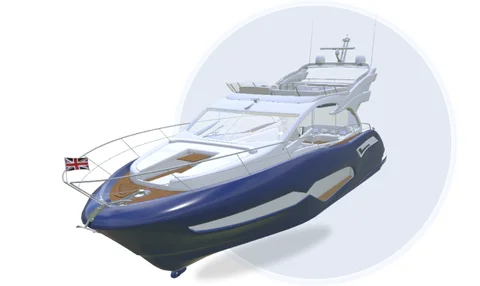
3D visualization elevates your sales process by providing a high-fidelity, interactive experience that translates complex data into a clear physical reality. This visual transparency builds immediate customer confidence, ensuring that every custom configuration is understood and approved before the order is ever placed.
Interactive 3D models simplify complex options and build buyer confidence by making every configuration tangible. This visual clarity inspires customers.

Showcasing your products in 3D reinforces your brand’s modern, forward-thinking image and signals to the market that you operate at the cutting edge of technology.

Visualizing products in 3D helps users make accurate choices, reducing errors, and shortening the sales cycle.

New team members can quickly understand complex products, ensuring effective sales support from day one. Your staff can master intricate technical details through visual intuition rather than relying on dense manuals.
Set up 3D visualizations yourself or let our expert engineers handle the heavy lifting. Using your CAD or STEP files as a foundation, we use Blender and Verge3D to build clean, lightweight parametric models.
By focusing on sales-driven performance rather than technical bulk, we ensure your configurator loads instantly and integrates seamlessly.

Take your product configurations to the next level with Hive CPQ’s 3D features. Provide clarity and precision.

Bring your products to life with custom environments. These 3D visualizations represent typical settings where the configured product would be used, giving users a realistic view of their selections. Configurator users can turn the environment on and off to their liking.
You can also let customers upload a photo of their own space – for example, their garden – to see how their newly configured pergola would fit in. They can adjust the placement, tweak the configuration, and refine the design until it feels just right.

Do you need to work on detailed plans too? With Hive CPQ, you can effortlessly toggle between 2D and 3D views during the configuration process.
This flexibility ensures a smoother workflow, allowing you to work in the visualization mode that best suits your needs – whether it’s precise technical planning in 2D or product exploration in 3D.

Stop letting complex specs slow down your sales. Hive CPQ turns technical data into high-performance 3D visuals and automated snapshots that fit perfectly into your quotes.

Elevate your proposals with the Virtual Photographer tool, which automatically generates high-resolution images of your custom configurations and embeds them directly into quotes and technical sheets.
For deeper technical transparency, these sheets can include dynamic cross-sections and precise component measurements, providing a comprehensive visual record that builds trust and accelerates the final approval.

Hive CPQ delivers high-performance 3D visualization that remains fluid even under the weight of complex configurations.
By replacing heavy CAD files with lightweight models and utilizing placeholder images during initial loads, the system ensures a frictionless experience. This performance-first approach allows for continuous configuration without lag.

If your team isn't ready for full 3D manipulation, you can still deliver high-impact realism through photorealistic stills. By uploading high-quality renders to the Hive Design Studio, you provide customers with a rich, 3D-looking experience through static imagery.
While users won't tilt or pan the model, a curated carousel of different angles and configurations provides all the visual inspiration and clarity needed to finalize a selection.
The visual configurator was a key factor. The customer can now see in 3D what they’re going to receive. That helps a lot – the end customer can follow along and instantly see what to expect. That was very important for us.Evert Haverkamp Head of Internal Sales at Nauta BV
Yes, your CAD files will serve as the basis for the work of our 3D engineers. Using Verge3D and Blender, they’ll translate these files into 3D models that we can connect to the configurator. The result is some brand-new 3D files that are much lighter – and therefore faster – than your CAD files. Starting from the CAD files saves our team a lot of work.
For photorealistic renders and next-level 3D simulations, we work closely together with some partners, such as Visuals for Brands. Their expertise in product visualization combined with our know-how in Configure, Price, Quoting creates powerful solutions and impressive customer experiences.
Yes, you can upload pictures. Say for example, that you’d like to get an idea of what your newly configured pergola would look like in your garden. In that case, you can simply click on “Photo simulation” in the configurator, upload a picture of your garden, and instantly see the 3D model inside your garden. You can move the 3D around or make adjustments to measurements if necessary.
While it is technically possible for you to build and maintain the 3D models in Verge3D and Blender, we highly recommend working together with our team of 3D engineers. They have the know-how and expertise to quickly build and optimize the models you want. You’ll be able to go live much faster, and with optimized models.

